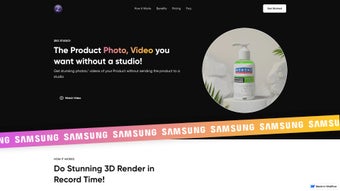

Download Zeg AI – 3D Visual Generator, Free & Secure Tool for Marketing, AR & VR
Introduction
In today’s fast‑paced digital marketplace, visual content is the bridge between a product and a potential buyer. Yet creating high‑quality 3‑dimensional visuals traditionally demands expensive equipment, specialized software, and a team of skilled artists. That barrier is about to disappear for anyone willing to embrace a cloud‑based solution that blends artificial intelligence with intuitive design tools.
Zeg AI arrives as a web‑first platform that transforms a handful of simple photographs into polished 3D renders ready for e‑commerce listings, advertising campaigns, or immersive AR/VR experiences. Whether you are a solo entrepreneur launching a new gadget, a marketing agency looking to scale visual production, or an educator seeking interactive teaching assets, Zeg AI promises a workflow that is fast, affordable, and environmentally responsible. The service operates entirely in the browser, eliminating the need for powerful local hardware while ensuring that every upload is encrypted and processed on secure, GDPR‑compliant servers.
In the sections that follow we will explore how Zeg AI works, what makes it stand out among competing tools, and why its free tier can be a game‑changer for small‑scale creators. By the end of this review you’ll have a clear picture of the platform’s capabilities, its system requirements, and the exact steps to get started without spending a dime.
Overview & Core Features
Zeg AI is a cutting‑edge, web‑based application that lets anyone create high‑quality 3D product visuals without stepping foot in a physical studio. By simply uploading one to three reference photographs, the platform automatically builds a detailed three‑dimensional model, places it into a variety of realistic scenes, and renders a polished image ready for marketing, e‑commerce, or educational use. The entire rendering pipeline takes only two to three minutes on a standard internet connection, making rapid iteration possible even for tight deadlines.
Zeg AI shines for small businesses, freelancers, and educators who need professional‑grade imagery but lack the budget or technical expertise for traditional photogrammetry or 3D modeling software. The tool also supports brand customization—logos, text overlays, and color schemes can be added directly in the browser, ensuring brand consistency across every visual asset. Sustainability is baked into the service: by eliminating the need for shipping physical props or setting up lighting rigs, Zeg AI operates with a zero‑carbon footprint.
Beyond static images, the generated 3D assets are compatible with augmented reality (AR) and virtual reality (VR) experiences, giving marketers a pathway to immersive product showcases. With a free tier that allows initial shoots and a range of paid plans for higher volume and premium features, Zeg AI offers a flexible, cost‑effective solution for anyone looking to boost visual storytelling with minimal effort.
- Instant 3D Model Generation: Upload 1‑3 photos and receive a fully textured 3D model in under three minutes.
- Extensive Scene Library: Dozens of pre‑designed environments—from studio backdrops to outdoor settings—help showcase products in context.
- Brand‑Centric Tools: Add logos, watermarks, and custom text without leaving the browser.
- AR & VR Export Options: Export in GLTF, OBJ, or USDZ for seamless integration into immersive experiences.
- Zero‑Carbon Workflow: Cloud‑based rendering eliminates physical prop production and reduces travel emissions.
- Free Starter Plan: Generate up to three renders per month at no cost.
- Scalable Subscription Model: Tiered pricing fits freelancers, agencies, and enterprises alike.
- Cross‑Device Accessibility: Runs on any device with a modern Chrome browser—Windows, macOS, Android, iOS, and Chrome OS.
- Secure Cloud Processing: End‑to‑end encryption meets GDPR and CCPA standards.
- AI‑Driven Lighting & Shadowing: Automatic lighting simulation creates realistic reflections and shadows.
Installation, Usage & Compatibility
Getting started with Zeg AI is intentionally straightforward because the platform is fully cloud‑based and requires no local installation. Begin by visiting the Zeg AI website and creating an account using an email address or a social login such as Google or Microsoft. After confirming your email, select the free starter tier or a paid plan that matches your expected rendering volume.
The dashboard guides you through a simple workflow: click “New Project,” drag and drop one to three high‑resolution photos of your product, and let the AI engine detect edges, textures, and geometry. Once the model is generated, you can choose a background scene from the extensive library and use the built‑in branding tools to add logos, adjust text size, and apply brand‑specific colour palettes. When you hit “Render,” a high‑resolution image (up to 4K on paid plans) appears within two to three minutes.
You can preview, rotate, or tweak lighting angles before finalising the output. Download options include PNG, JPEG, TIFF for static visuals, or GLTF/OBJ for 3D meshes ready for AR/VR integration. Files can be saved locally or sent directly to cloud storage services like Google Drive or Dropbox.
A shareable link is also generated for easy embedding on websites, email campaigns, or social media—no additional plugins required.
Zeg AI’s only hard requirement is a modern web browser that supports WebGL and HTTPS. For optimal performance, we recommend the latest version of Google Chrome on desktop or mobile. The service has been tested on the following operating systems and devices:
- Windows 10/11 (64‑bit): Minimum 4 GB RAM; no dedicated GPU needed.
- macOS 11 (Big Sur) and later: Intel and Apple‑silicon Macs run smoothly in Chrome.
- Chrome OS: Fully functional on Chromebooks, ideal for classroom settings.
- Android 8.0+: Chrome mobile enables touch‑gesture navigation of scenes.
- iOS 13+ (iPhone & iPad): Chrome on iOS offers the same capabilities as desktop, though rendering speed may vary with network conditions.
Because all heavy processing occurs on Zeg AI’s cloud servers, the client device only needs a stable internet connection (minimum 5 Mbps recommended). Users on slower connections may experience longer upload times for high‑resolution images but will still benefit from the same AI‑powered rendering on the back end. The platform also follows WCAG 2.1 AA accessibility guidelines, providing keyboard navigation, screen‑reader support, and high‑contrast UI options.
Pros, Cons & Frequently Asked Questions
Pros
- Instant 3D generation eliminates need for costly photogrammetry hardware.
- Free starter tier enables risk‑free testing for small projects.
- Cross‑platform support through Chrome makes it usable on virtually any device.
- Built‑in branding tools keep visual assets on‑brand without extra software.
- Export options for AR/VR open new marketing channels.
- Zero‑carbon workflow aligns with sustainability goals.
- Secure, GDPR‑compliant data handling protects intellectual property.
- Rapid rendering (2‑3 minutes) speeds up content pipelines.
- Responsive customer support and active community forum.
- Scalable pricing fits freelancers to enterprise teams.
Cons
- Requires a stable internet connection; offline work is not possible.
- Complex objects with intricate internal geometry may need manual refinement.
- Limited control over lighting compared to professional 3D suites.
- Free plan caps renders at three per month, which may be restrictive for heavy users.
- Exported meshes can be large; additional compression may be required for web use.
Frequently Asked Questions
How many images do I need to upload for a good 3D model?
Zeg AI works best with 1‑3 high‑resolution photos taken from different angles. One clear, well‑lit image can produce a basic model, while adding two more perspectives improves texture fidelity and reduces reconstruction errors.
Can I edit the 3D model after it is generated?
Direct mesh editing is not part of the web UI, but you can export the model (OBJ/GLTF) and refine it in external 3D software like Blender or Maya if advanced modifications are required.
Is there a limit to the resolution of the rendered images?
The free tier renders up to 1920 × 1080 px. Paid plans unlock 4K (3840 × 2160 px) and even 8K options for large‑format print or high‑detail digital displays.
How does Zeg AI ensure data privacy?
All uploads are encrypted with TLS 1.3 during transfer and stored encrypted at rest. Images are automatically deleted from the server after 30 days unless you choose to keep them in your account library.
Can I use the generated visuals for commercial advertising?
Yes. Both free and paid plans grant full commercial rights to the rendered assets. The only restriction is that the underlying product photos must be owned or licensed by you.
Conclusion & Call to Action
Zeg AI represents a significant leap forward for anyone who needs high‑impact 3D product visuals without the overhead of a traditional studio. Its blend of AI‑driven automation, brand‑centric customization, and sustainability makes it a compelling choice for e‑commerce merchants, marketers, educators, and hobbyists exploring AR and VR. The free starter plan removes the barrier to entry, while the scalable subscription tiers ensure that growing teams can keep pace with increasing demand. If you’re ready to replace costly photo shoots with a secure, fast, and environmentally friendly workflow, simply sign up for Zeg AI today and start generating stunning 3D visuals in minutes. Embrace the future of product presentation—download, create, and showcase with confidence.






